A full beginner day with Gray and Brian, a welcome reception 73 stories up, and two hands-on build days for everyone. This is the 2027 agenda for Atlanta, January 5, 6, and 7: day one Foundations, day two Refresh and Build, day three Build, minute by minute. Registered attendees get any updates first.
◷ Foundations · Refresh and Build · Build◆ Hands-on, not lecture★ Early bird through Nov 20, 2026
Beginner 3-Day Workshop
Tuesday, Wednesday, and Thursday. Welcome reception included. $2,999 early bird, then $3,499.
Intermediate and Advanced 2-Day
Wednesday and Thursday, plus the Tuesday night welcome reception. $2,499 early bird, then $2,999.
8:00 AM – 4:00 PM · Beginner 3-Day Workshop attendees
Built for the operator who is starting from zero or close to it. Gray and Brian trade the room all day: Gray on the foundation every later build sits on, Brian on the database and the email campaign that run on top of it. You leave Tuesday with a live page on the internet, a scheduled daily brief, and a database you own.
8:00 AM45 min
Breakfast & Check-In
8:45 AM15 min
Welcome from Brian & GrayWhat today is for, and how the next three days fit together.
9:00 AM80 min
Foundations, Part 1: How to Talk to Your AI · Gray ScottThe words, the parts, and the loop. What an LLM actually is, what makes an agent an agent, and the three loops every working system runs on. Chat, Code, Projects, Skills, connectors, and Scheduled Tasks, and when to use each. A prompt structure that gets real results. Learn more →
10:20 AM10 min
Coffee Break
10:30 AM55 min
Session 1: Database Creation and Data Ingestion · Brian PaschDatabase structures, designs, and constraints. Importing existing data and scraping new data. Installing the data management tools inside Claude: Apollo, ZeroBounce, and Apify. You start building a database of local businesses for a concierge buying service. Learn more →
11:25 AM65 min
Foundations, Part 2: Knowledge Files, Skills, and Guardrails · Gray ScottGive Claude the context it needs: your voice file, your store file, your rules file. Build your first Project, write your first Skill, and set the guardrails that keep it in bounds. Build #1: the daily summary of your day ahead, running before lunch. Learn more →
12:30 PM45 min
Lunch
1:15 PM55 min
Session 2: Database Hygiene and Activation · Brian PaschAppend and test third-party data, stand up a clean email server with SendGrid, warm it up, keep it off blacklists, and set delivery and open-rate goals. Then build your first email campaign and let AI read the replies. Learn more →
2:10 PM10 min
Break
2:20 PM80 min
Foundations, Part 3: The Four Buildings and Your First Deploy · Gray ScottWhere working tools live: GitHub, Vercel, Supabase, and the messengers. The scouts that read the web for you. Two mini workshops: ship your first page to Vercel and scrape your first site, with Claude doing the typing. Learn more →
3:40 PM20 min
Wrap with Brian & Gray: What You Built Today & What Tomorrow Brings
4:00 PM
Beginner Day EndsRest up. The reception starts at 6:30.
Tue · Jan 5
The Welcome Reception
6:30 PM – 8:30 PM · Every attendee, both tiers
6:30 PM120 min
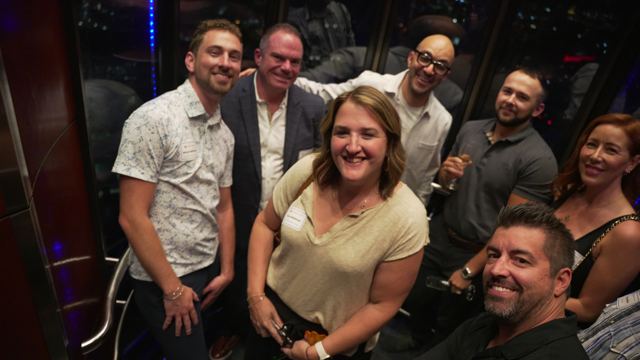
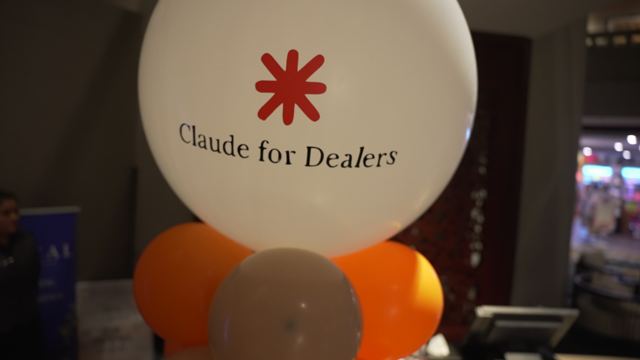
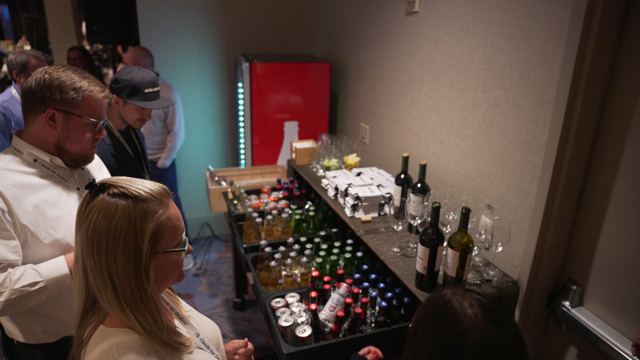
Welcome Reception · 73rd Floor, The Sun DialLike last time: lamb, seafood, champagne, and an open bar with a wraparound view of Atlanta 73 stories up. Come relax, meet your fellow builders, and get to know the room before the building starts. You don't want to miss this. Learn more →
Atlanta, September 2026 · The Sun Dial
This is what the first night looks like.
Both tiers are in the room Tuesday night. The intermediate and advanced two-day starts here, and the beginner three-day gets to celebrate the first build.
Welcome from Brian & GrayOpening remarks and some AI stats across the industry.
8:15 AM15 min
A Word from Our Presenting Sponsor — FoureyesMelody Edwards and Catherine Davidson of Foureyes kick off the next two days of building.
8:30 AM
Advanced Track Departs
8:30 AM150 min
The Pit Stop: AI Tune Up, Rules of the Road, and Live Unsticking · Gray ScottEveryone lines up on the same grid before two days of building. A fast AI overview of what changed and what matters, the rules every build lives or dies by, then the room tells us where they get stuck and Gray fixes real builds live on the screens. You leave with your build brief for the next two days and the Unstick Skill in your Claude. Learn more →
11:00 AM15 min
Coffee Break
11:15 AM45 min
How to Use Supabase to Manage the Data in Your Projects — Brian Pasch
12:00 PM45 min
Building Out Your Data Hygiene Routine — Brian Pasch
12:45 PM30 min
Lunch & Learn — Dealer StreamFresh results from the Pasch pre-workshop survey, plus a plain-English look at blockchain and how it's already tightening dealer marketing strategy.
1:15 PM60 min
Build a Marketing Analyst Agent on Your ASC Data — Garrett Roach & Mike Morgan, Launch LabsConnect your GA4 to Claude and build an analyst that speaks ASC: sales, service, and verified households, answered in plain English. Learn more →Pre-work (10 min) →
2:15 PM120 min
Pain. Problem. Prototype. Build working solutions with your own data, starting with aged inventory.A repeatable Pain → Problem → Prototype framework, worked live on aging inventory with the Foureyes MCP. Learn more →What is Foureyes? →
4:15 PM30 min
Beer Break & Siro Presentation — Mack FellThe technology every F&I needs to train and grow while protecting the consumer. A win win for both sides that increases F&I double digits.
4:45 PM45 min
Spy Then Sell: Competitive Intelligence With Claude Code — Elijah SurrattSession prep →
5:30 PM30 min
Build an SEO Audit Engine — Gray Scott
6:00 PM15 min
Day Recap & What Tomorrow Brings
Thu · Jan 7
Day Three: Build
7:00 AM – 6:15 PM · Every attendee, both tiers
7:00 AM60 min
Breakfast
8:00 AM90 min
Oh My Dash! — with Alex OBring one CSV out of your CRM. Leave with a live, password-protected dealership dashboard on your own numbers, in a repo you own. No black box, no code. Learn more →What you'll need →
9:30 AM45 min
Agent Talk — Dustin SchulerYour dashboard answers the questions you already knew to ask. The conversation finds the ones you didn't. Learn more →What you'll need →
10:15 AM15 min
Coffee Break
10:30 AM60 min
AI Content Engine (Anti-Slop) — Dustin SchulerTwo formats cover almost every video your store needs. We build both, and we build them so they do not look like AI made them. Learn more →What you'll need →
11:30 AM30 min
Lunch & Learn — AET AutomotiveThe platform that saves you money and hours on creative and execution, now with AI built in to help your store actually stand out.
12:00 PM120 min
Podium Masterclass: Build Your Dealership's "Eye of Sauron" with ClaudeFrom the company behind the #1 AI agent for dealerships: turn scattered DMS data into a morning command center and build custom AI tools live. Learn more →
2:00 PM90 min
🎨 Design Your Decisions ✨ — Lisa GenerBuild a design system in two layers, the OEM standards you're locked into and the store identity that's yours, then watch Claude apply it to everything after. Learn more →
3:30 PM30 min
Beer Break + Presentation
4:00 PM60 min
Power HourOne open floor, every builder in the room. Gray, Dustin, Brian, Daniel, Elijah, Lisa, Alex and partners at your table to help you build what your store is missing. Learn more →
5:00 PM45 min
Show & TellThe mic is yours. Show the room what you built, or the thing that's killing it at your store. Learn more →
5:45 PM30 min
Wrap, Thank You & Close. Ciao.
2027 · Registration Open
We Will Sell Out. Secure Your Seat Today.
2026 sold out. Early bird pricing runs through November 20, 2026: $2,999 for the Beginner 3-Day Workshop and $2,499 for the Intermediate and Advanced 2-Day plus Welcome Reception.
The words first. AI, LLM, API, JSON, MCP, CLI, CSV, MD, and the rest of the alphabet you will hear all week, in plain English, each with a dealership example.
What makes an agent. It writes the script, runs it, reaches your systems through an API or a connector, reads what comes back, hits an error, and corrects itself. That loop is the whole game.
The three loops. The fix loop (it retries until it works), the clock loop (scheduled tasks that run while you sleep), and the human-in-the-loop (the checkpoint you keep for anything that touches a customer or a dollar).
Which tool for which job. Chat, Code, Projects, Skills, connectors, and Scheduled Tasks, and the moment you should open the terminal instead of the chat box.
Prompt structure. Role, context, task, format, guardrail. The template you will reuse for every build this week.
You leave Part 1 with a working vocabulary and the prompt template every later build sits on.
Tuesday · 11:25 AM · 65 min · Gray Scott
Foundations, Part 2: Knowledge Files, Skills, and Guardrails
Three knowledge files. A voice file (how your store sounds), a store file (hours, brands, people, policies), and a rules file (what Claude must never do). Plain markdown, written once, used everywhere.
Your first Project. The knowledge files plus standing instructions, so every conversation starts already knowing your store.
Your first Skill. A repeatable task Claude runs the same way every time, with your rules baked in.
Guardrails. The lines you draw before anything touches a customer, a price, or a dollar.
Build #1: the daily summary of your day ahead. Calendar, tasks, and the numbers you care about in one brief, delivered by a scheduled task before you open your laptop.
Build #1 runs before lunch. It is small on purpose: it proves the loop, and you scale the same pattern for the rest of the week.
Tuesday · 2:20 PM · 80 min · Gray Scott
Foundations, Part 3: The Four Buildings and Your First Deploy
The four buildings. GitHub is the deal jacket, the record of every file and every change. Vercel is where your web tools live. Supabase is the database in a box. Resend and Twilio are the messengers for email and text.
Also on the lot. Stripe for payments, Zapier for glue, the Anthropic API for when you want Claude inside something you built, Cloudflare for the front door.
Scouts. The tools that read the web for you, from the free Playwright connector to the paid crawlers, and when to use which.
Mini workshop one. Ship your first page to Vercel. Claude types, you direct.
Mini workshop two. Scrape your first site and save the result as a file you own.
The move that unlocks everything. When you are stuck, screenshot it and ask Claude what to click.
By 3:40 you have a live page on the internet, a scraped data file, and the database from Brian's sessions sitting behind it.
Wednesday · 8:30 AM · 150 min · Gray Scott
The Pit Stop: AI Tune Up, Rules of the Road, and Live Unsticking
The tune up (20 min). A fast AI overview for the whole room: what actually changed since Atlanta, how Chat, Code, Projects, Skills, connectors, and Scheduled Tasks fit together, and the agent loop in five minutes for anyone who skipped Day One.
Rules of the road (25 min). The things to keep in mind before any build: start with the pain, not the tool. Ship small, then stack. Keep your files in a Project, not in a chat. Start a fresh chat before it gets heavy. Dummy data first, production data last. A human checkpoint on anything that touches a customer or a dollar. Save every working version so you can always roll back.
Where are you stuck? (30 min). Open Q&A. The room drops its sticking points on the wall and in the live poll, Gray sorts them in real time, and we see the patterns: the errors, the walls, and the moments people quit.
Live unsticking (45 min). Ad hoc problem solving on the big screens. Gray pulls real stuck builds from the room, yours included, and fixes them live, saying out loud what he checks first, what he asks Claude, and when he starts over.
Your build brief and the Unstick Skill (30 min). Write a one page brief for the build you are shipping by Thursday, using the prompt template, then install the Unstick Skill: paste an error or a screenshot and it walks the same checklist Gray just ran on stage.
By 11:00 you have a clear build brief for the next two days, the answers to the questions that were holding you up, and a Skill that gets you unstuck when Gray is not standing next to you.
Tuesday · 10:30 AM · 55 min · Brian Pasch
Session 1: Database Creation and Data Ingestion
Two of the five Day One sessions are about data, because every system Gray shows you is only as good as what you feed it. The build is a database of local businesses, the foundation for an email campaign offering a concierge buying service. Ideal for multi-brand groups.
Database structures, designs, and constraints. What a clean table looks like before you add a single row.
Importing existing data. The exports you already have, loaded the right way.
Data scraping. Filling the gaps with sources you can reach.
Installing data management tools in Claude. Apollo, ZeroBounce, and Apify, set up and tested from inside Claude.
Bring a laptop you can install tools on. The specific accounts you will need are in the pre-work email before January.
Tuesday · 1:15 PM · 55 min · Brian Pasch
Session 2: Database Hygiene and Activation
Appending third-party data. Data hygiene testing with Apollo, data integrity testing with ZeroBounce, and data signals testing with Client Command ASN.
Activating your data. Creating a clean email server with SendGrid, warming it up, tips for reducing blacklisting, monitoring delivery performance, and setting delivery and open-rate goals.
Developing your first email marketing campaign. Letting AI read your emails, and recognizing when an email needs to be escalated to a human.
You leave with a live database, a warmed email server, and your first campaign queued.
Tuesday · 6:30 PM · 120 min · Both tiers
Welcome Reception at the Sun Dial
Seventy-three floors up with a wraparound view of Atlanta, like last time. Lamb, seafood, champagne, and an open bar. This is where the room meets: the beginners who just shipped their first build, the operators arriving for the two-day, and every builder on the roster.
The Sun Dial is downtown, minutes from the JW Marriott. Details on timing and transportation go to registered attendees before January.
Included in both tiers. You don't want to miss this.
Thursday · Build · 8:00 AM · 90 min
Oh My Dash! with Alex O
Alex Oleynik
Build your own dealership dashboard in 90 minutes. We'll rebuild the Revenue Recovery screen on your data: the one that finds lead sources that used to produce sales and quietly stopped, and puts a dollar figure on winning them back.
You bring one CSV out of your CRM. You leave with a working, deployed, password-protected dashboard on your own numbers, in a repo you own.
The point of the session is that there's no black box. Every headline number, closing ratio, average gross, recoverable revenue, is calculated from a plain monthly export. You'll see exactly how, and you'll be able to build the next screen yourself.
You won't be writing code. You'll be describing what you want, reviewing what Claude Code builds, and catching the numbers that look wrong, which is the actual skill worth having.
Have these ready before you walk in Thursday morning
Claude Code, installed and signed in before you arrive. Setup during the session costs you 20 minutes of build time.
Your CRM lead-source report, exported to CSV: one row per month, per lead source, 12 months minimum, 36 ideal. Columns: period, store, source, lead_type, leads, sales, new_sales, used_sales, gross, budget. In most CRMs this is "Lead Source ROI" or "Lead Source Performance". No customer PII — aggregate counts only.
A GitHub account (free) and a Vercel account (free) to deploy at the end.
Optional: a GA4 export by month and channel, if you want traffic alongside CRM sources.
Can't get the export in time? Come anyway. The workshop repo ships a realistic 36-month sample dataset. You'll build the whole dashboard and swap your own file in afterwards. Nobody sits out.
Thursday · Build · 9:30 AM · 45 min
Agent Talk
Dustin Schuler · Bud Clary Auto Group
Your dashboard answers the questions you already knew to ask. The conversation finds the ones you didn't.
Dashboards run on connections. Once those connections exist, the dashboard is only one thing you can do with them. This session is the other three: asking questions nobody built a tile for, setting an agent to run overnight and speak up only when a number crosses a line you set, and reconciling two systems that hold the same fact and report different numbers. That last one is where the money is.
You leave with: your own morning brief, built to your seat.
Have these ready before you walk in Thursday morning
A commercial Claude plan (Team, Enterprise, or API, not a personal account).
One CSV export of inventory from your DMS, inventory system.
A link to your third-party page for a store within your group. I.e. https://www.autotrader.com/car-dealers/longview-wa/70231/bud-clary-chevrolet
Thursday · Build · 10:30 AM · 60 min
AI Content Engine (Anti-Slop)
Dustin Schuler · Bud Clary Auto Group
Two formats cover almost every video your store needs. We build both, and we build them so they do not look like AI made them.
If you hear "AI video" and think marketing, it's time to think bigger. Nearly every video a dealership needs is one of two shapes: a product video where the vehicle is the hero and nobody is on camera, and a presenter video where a real person delivers information. Learn those two and you can point them at any department. HR onboarding is a presenter video. F&I product value is a product video. The service pay-over-time explainer, the thank-you video, the walkaround on your VDP, all the same two shapes.
We build a vehicle video off a real listing and an acquisition video for the customer thinking about selling you their car. Then the part that matters: the five rules separating a usable video from slop, and the critique loop where Claude watches your video back, tells you what is wrong with it, and you regenerate against that. Slop with your logo on it is worse than no video at all.
You leave with: one finished vertical video built from your own store's inventory, both production prompts ready to reuse, and a locked brand setup so the next one matches.
Have these ready before you walk in Thursday morning
Claude Pro and Claude Code, same as the other sessions.
A Higgsfield account with credits, individual Pro minimum or an active trial. Connection set up before you arrive.
On your laptop: your logo, your brand colors, a photo of a real employee who can front a video, and one vehicle listing URL from your own site.
Thursday · Build · 2:00 PM · 90 min
🎨 Design Your Decisions ✨
Hands-on with Claude Design for Dealer Leadership · Lisa Gener
In this hands-on session you'll build a design system in two layers: the OEM standards you're locked into, and the store identity that's yours. Build it once and Claude applies it to everything after.
From there you'll use that system to produce a model comparison page, a marketing campaign, an inventory analysis, and a monthly one-pager performance report. One system, four very different documents.
The foundation is what compounds. A system built once should hold its shape across a customer landing page, an inventory analysis, and a report your executives read. That's what you're building first, and it's why the rest goes so fast.
You leave with a design system and a full set of working assets, not slides.
Thursday · Build · 4:00 PM · 60 min
Power Hour
Every builder in the room, on your side
Group up with your colleagues and friends and build. This is the hour the whole workshop turns into one open floor: your laptop, your store's real problems, and every presenter in the building within arm's reach.
Gray, Dustin, Brian, Daniel, Elijah, Lisa, Alex and our partners are all on the floor. Stuck on a prompt? Wiring up a connector? Halfway through the dashboard you started this morning? Flag someone down. Think of it as study hall, except the tutors build dealership AI for a living.
Come with the thing your store is missing. Start it here, with help three feet away, instead of alone at your desk next Tuesday.
You leave with a real build in motion, not a to-do list.
Thursday · Build · 5:00 PM · 45 min
Show & Tell
Your build, on the big screen
Show us what you're most excited about, or something you've built that's flat-out killing it. Three days of building comes down to this: your work, on the screen, in front of a room that actually gets it.
Bring the agent that saves your BDC an hour a day. The dashboard your GM actually opens. The video nobody can tell was AI. Polished or held together with duct tape, if it works, show it.
This is your time to show off your AI prowess. Nobody in this room calls that bragging. We call it proof.
The best ideas in the room leave in everyone's laptop.
Thursday · Build · 12:00 PM · 120 min
Podium Masterclass: Build Your Dealership's "Eye of Sauron" with Claude
From the company behind the #1 AI agent for dealerships: turn scattered DMS data into a morning command center and build custom AI tools live.
Build Live with Claude: Get hands-on keyboard experience using Claude to construct daily reporting hubs, track key performance metrics, and automate operational workflows.
Replicate the "Eye of Sauron": Discover how unifying raw DMS data into a single intelligence hub gives leadership total visibility into daily performance across your store.
Scale Without Overhead: Walk away with ready-to-use AI skills and see how Podium handles the ongoing software maintenance so you can focus on running your store, not managing custom code.
Launch Labs · Pre-work · 10 minutes or less
Connect your GA4 before you arrive
Set up the automotive-specific Google Analytics MCP connector through FocalGraph Signal by Launch Labs
You'll need: your work email address, and admin-level access to a Google Analytics property for one of your stores. Not the admin? Get through step 7 below, then email the connection instructions to the person on your team who is.
Click Connect Google Analytics and verify the connector
Make sure you're signed into Google with an account that has admin permissions for the GA property you're connecting
Pick the correct GA4 account from the list and click Continue
See the success message. All done!
Accounts are approved in advance. Launch Labs will approve all participating dealers directly before the session. Questions or issues: Garrett Roach · garrett@launchlabs.ai | Mike Morgan · mmorgan@launchlabs.ai
In this hands-on session you'll connect your GA4 to Claude using an MCP built specifically to understand dealership website data and the latest ASC (Automotive Standards Council) specification.
From there you'll stand up an AI marketing analyst that answers real questions about your site in plain English: which channels and sources drive engagement, how your campaigns and landing pages perform, where your ASC events are strong or missing.
We'll also show how FocalGraph Signal can extend that picture with first-party sale, service, and verified-household attribution for dealers who want to go deeper.
Pain. Problem. Prototype. Build working solutions with your own data, starting with aged inventory.
In this two-hour, hands-on session, you'll learn a repeatable framework for solving any dealership problem: moving from Pain → Problem → Prototype. We'll work it live, using aging inventory as our example, but you'll walk away with a method you can apply anywhere.
Pain → Problem. You already feel the pain: units aging out, maybe a hunch about why. What's missing is clarity and conviction. We'll dig into the data with Claude to understand the problem actually driving it.
With the root cause in hand, we bring in Claude's research mode for outside context, gathering trends and guidance from sources the industry trusts, and layering it with your own data. We'll work with Claude to brainstorm potential tactics and pick one to tackle first.
Prototype. Then we build it. Using the Foureyes MCP, we'll turn that one tactic into a working tool wired to your own data, ready to put to work the moment the session ends.
Once the framework holds up on inventory, we'll point it at one or two more problems, to prove it's not a one-trick exercise.
You'll leave with the framework itself, plus a working tool, built on your own data, already running when you walk out the door. No engineers required.
Session partner
What is Foureyes?
Foureyes is the dealer-owned data platform built for automotive. We pull together the data that normally sits in separate systems (DMS, CRM, website, and inventory), and make it usable at the rooftop and group level. The Foureyes MCP connector used in this session supplies the data and usage instructions directly to Claude.